
Incident Personnel and Call Credit
A tone drops at 2 a.m. Two members catch the engine, one drives straight to the scene in their own truck, and two more make it to the station just as the engine pulls out. They stay, stand by the second rig, and go home when the call clears. Every one of those five responded. Only three went to the scene.
Command Established records all five, and it keeps track of which is which — because "who responded" and "who was on scene" are different questions, and different parts of the system need different answers. This article explains the three ways a member can be attached to an incident, what each one counts toward, and why your CAD-imported response times reflect your own units.
Three ways a member can be on an incident
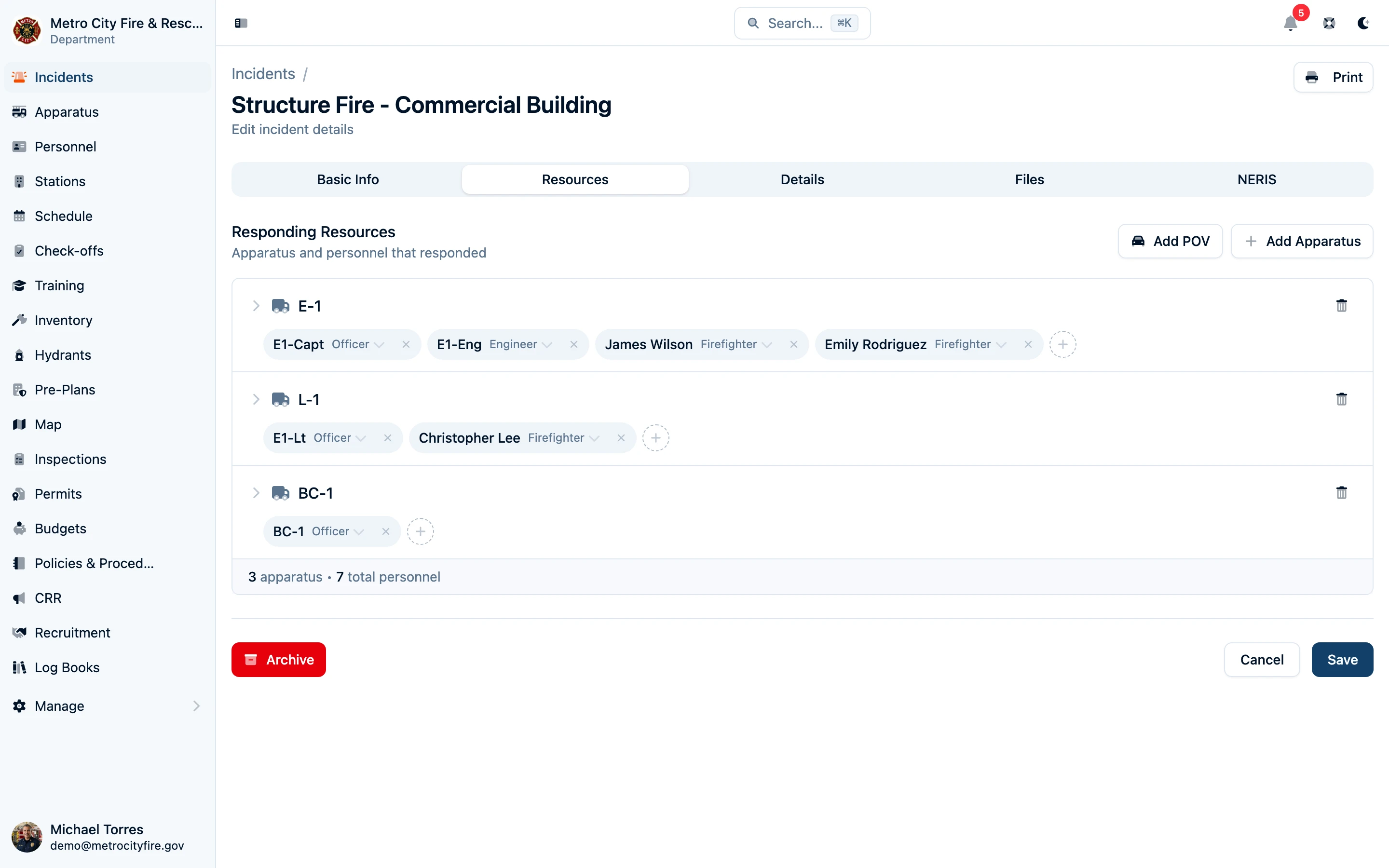
On an incident's Resources tab, personnel are recorded under one of three headings:
| Section | Who belongs here | Went to the scene? |
|---|---|---|
| Apparatus | Members who rode on a rig, with a riding position | Yes |
| Personal Vehicle (POV) | Members who arrived at the scene in a personal vehicle — drivers and any riders who came with them | Yes |
| Station Responders | Members who responded to a station but did not ride out | No |
A member goes in exactly one of these for a given incident. If you try to add someone who is on a rig or in a POV as a station responder (or the reverse), Command Established refuses rather than counting them twice. The one exception is within the Apparatus section: a member may be listed on more than one rig for the same incident, for a call where they genuinely crewed both.
Apparatus and POV responders are covered in detail elsewhere; see How POVs Are Reported to NERIS for the POV side. The rest of this article focuses on station responders and on what each section counts toward.
Giving a member call credit for covering the station
The scenario: A member came to the station on the tone, the first-out rig had already left, and they stood by at the station for the rest of the call. They never rode out. You want their turnout to count.
That member is a station responder. To record them:
- Open the incident and go to the Resources tab.
- Click Add Station. If your department has one station, a Station Responders section appears for it immediately. If you have several, pick the station the member responded to from the list.
- Use the Add crew member control in that section to search for the member and add them.
Station responders show up as name chips with no riding position — there is no role to assign, because they were not on a rig. Each station gets its own row, so a department with two houses can record who turned out to each.
Station responders appear on the incident's read-only view, on the printed run sheet under a Station Responders heading, and in the personnel count on the active-incident banner and responding view.
To remove a single member, remove their chip. To remove the entire section, use the section's remove control; you will be asked to confirm, since it removes every station responder on the incident.
What station responders count toward
This is the part that matters for your year-end numbers, so here is exactly what the system does.
Call credit and top responders — yes
Station responders earn one incident response, the same as a member who rode the engine. (A member listed on more than one apparatus for the same incident earns one response per assignment, so keep multi-rig assignments to cases where the member genuinely crewed both.) The Top responders list on the incident report counts them, and the per-member response totals that feed compliance evaluation include them.
LOSAP and compliance call counts — yes
Every Call count requirement in a compliance program is evaluated from the same per-member response records, and those records include apparatus crews, POV responders, and station responders alike. That means:
- A threshold-mode requirement such as "50 calls to stay active" or "50 calls for the annual stipend" counts a station response as a call.
- A points-mode (LOSAP) category such as "Alarms — 1 point per alarm, max 40" awards a point for a station response.
- A call-count requirement filtered by NERIS incident type still counts the station responder, as long as the incident's type matches.
If your department's bylaws or LOSAP plan say that only members who went to the scene earn credit, do not record the member as a station responder — Command Established does not have a separate "credit but do not count" option for this section.
See LOSAP Points Tracking and Compliance Programs for how to set those requirements up.
Personnel deployed — yes
The incident report's "personnel deployed" figures — total personnel deployed, firefighters per call, and the personnel-by-day breakdown — count station responders alongside apparatus crews and POV responders. A member who held down the station was committed to that call, so these figures treat them the same as the crew that rolled.
This changed in September 2026. Before then, station responders were left out of these particular figures. If you record station standby, your personnel-deployed numbers are higher than they used to be for the same calls — and because the incident report compares a period against the one before it, both sides of that comparison moved together, so your period-over-period trend is unaffected.
Note that these figures do not check whether a unit actually arrived: a crew on a rig that was cancelled en route still counts as deployed. A unit that was toned but never rolled at all does not.
Personnel hours — yes
The incident report's personnel hours figure multiplies each unit's crew by the time that unit was committed to the call. Station responders have no rig clock of their own, so they are credited the incident's duration, the same as POV responders. A unit that was cancelled en route stops counting at the cancellation, not when the call closed.
Counting hours until the crew is back at the station
By default a unit's time ends when it cleared the scene. If your department counts personnel hours until the crew is back in quarters, an administrator can turn on In quarters time under Settings → Incidents. The incident timeline then gets an In Quarters time after Completed.
When an incident has an In Quarters time:
- Every unit's time runs from its dispatch to In Quarters, not to when it cleared. The one exception is a unit whose own clear time is later than In Quarters: it keeps its clear time, because no unit is home before it leaves the scene.
- POV and station responders are credited dispatch to In Quarters.
- A unit cancelled en route still stops at the cancellation.
Incidents without an In Quarters time count exactly as before. In Quarters stays with your records and is not sent to NERIS. Once it is turned on, you can also make it a required field under Settings → Incidents → Required fields.
Incident personnel count — yes
The simple personnel count shown on an incident (in lists, the active-incident banner, and the responding view) includes station responders. It is a total of every crew assignment on the incident — apparatus seats, POV responders, and station responders added together — so a member listed on two rigs is counted twice.
Crediting a member who was excused from a call
The scenario: Four members spent the weekend at the county academy for Firefighter I. Two structure fires ran while they were gone. Your bylaws credit members for calls they miss while at fire school, and those credits matter for voting eligibility.
Those members were not on the call, and Command Established will not pretend they were. Instead, an officer excuses them from it. An excused member is credited for the call without being recorded as a responder.
To excuse members:
- Open the incident and go to the Resources tab.
- In the Excused section below the responders, click Excuse members.
- Pick one or more members, choose a reason — pick from the suggestions (fire school, training, military duty, department event, work detail, medical, bereavement) or type your own — add a note if you like, and confirm.
Each excused member gets their own entry showing who excused them and when. Remove an entry from the same section; you will be asked to confirm.
Excusing is governed by its own Call Credit Excusals permission, separate from editing incidents. Owners and administrators have it automatically; grant it to whoever your bylaws put in charge of call credit — often a line officer or the secretary — and they can excuse members even on an incident they cannot otherwise edit. Because credit disputes tend to surface at year end, excusals can be added or removed after an incident is approved and locked.
A member is either a responder or excused, never both
Someone who was on the call has nothing to be excused from. If you try to excuse a member who is on a rig, in a POV, or listed as a station responder, Command Established refuses. The reverse holds too: a member excused from a call cannot be added as a responder until the excusal is removed. The responder record always wins, and a member is credited once.
What excused members count toward
Excusals are deliberately narrow. They count toward exactly one thing, and only when you ask.
- Compliance call counts — only if the requirement says so. Each Call count requirement in a compliance program has a Credit excused calls option, off by default. Turn it on and excused calls count like responses, subject to the same NERIS type and custom field filters. You can also set a Max excused calls per period so eligibility cannot be made on excusals alone; the earliest excused calls count and the rest show as not counted. A member's compliance detail lists each excused call with its reason, so they can see how their total was reached.
- Everything else — no. Excused members do not appear in top responders, personnel deployed, personnel hours, or the personnel count on an incident, and they are never reported to NERIS. On the printed run sheet they appear under their own Excused (credited, not on scene) heading, apart from the resources.
Because the option lives on the requirement rather than the department, a LOSAP program and a voting-eligibility program in the same department can treat excusals differently.
How station responders are reported to NERIS
They aren't — and that is correct.
NERIS reports unit responses: an apparatus or a POV unit, with its staffing and its times. A member who stayed at the station was not part of any unit's response, so station responders:
- do not appear as a unit response in the NERIS submission,
- do not add to the staffing of any apparatus or the POV unit, and
- do not satisfy the NERIS requirement for at least one responding unit.
That last point catches people out. An incident whose only personnel are station responders is not ready for NERIS submission. It still needs at least one apparatus or POV responder — or, for a call where nobody responded, a no-action reason. Station responders are a Command Established record for your own credit and accountability; they are not something NERIS asks for.
Apparatus crews and POV responders are reported exactly as before. See How POVs Are Reported to NERIS for the POV unit rules.
Why your response times changed after a CAD import
The scenario: A chest-pain call came in, your engine arrived at 00:31, and the ambulance arrived at 00:38. After the CAD sheet was imported, the incident's on-scene time reads 00:38.
A dispatch sheet lists every agency on the call — the ambulance service, the sheriff, and mutual-aid companies as well as you. Command Established used to read an incident's en-route and on-scene times off whichever unit the CAD sheet happened to list first, which meant another agency's clock could set your department's response times.
Two things changed.
Times come from the earliest unit, not the first listed
For incidents created from a CAD run-sheet PDF, en-route and on-scene times are taken independently, each from the earliest unit that reported it. (Incidents created from text-only CAD emails with no PDF keep the times the email states.) The order units appear on the sheet no longer matters. One side effect: an incident whose arriving unit never logged an en-route time, but where another unit did, now records that en-route time where it previously had none. That is more accurate, but it does mean some older incidents will show an en-route time they did not have before when they are reparsed.
You can tell Command Established which units are yours
Under Settings > CAD Email, the Response Time Units setting lets you check which unit categories — FIRE, EMS, LAW — count as your department's own when recording response times. A fire department would typically check FIRE only. The same selection decides when an incident counts as completed: if the sheet has no formal closed time, the incident is marked complete once all of your selected units have cleared, even if other agencies' units are still on scene.
With the setting on:
- Only units in the checked categories set your en-route and on-scene times.
- If none of your units appear on a sheet (an EMS-only call, say), the incident records no response times rather than borrowing the ambulance's. Reparsing such an incident clears any times that came from another agency.
- If one of your units does appear but never logged a particular time (your engine has an on-scene time but no en-route time, say), reparsing leaves any previously stored value for that one time in place — it does not clear it. Check such incidents by hand after a reparse.
- If the CAD sheet does not label its units with a category at all, the filter is skipped and every unit counts, so an unlabelled sheet cannot wipe your times.
Leaving every box unchecked keeps the historical behaviour: every unit on the sheet counts. That is the default for every department, so nothing changes until you turn it on.
Once you set it, incidents already imported keep their old times until their CAD email is reparsed. In the Recent dispatch messages list on the same settings page, use the reparse control on an individual email, or Reparse All to reprocess stored emails. Emails are kept for seven days, and only the newest 100 are available to reparse (individually or with Reparse All); if you receive more than that in a week, older incidents keep their existing times and can be edited by hand on the Basic Info tab.
Leaving chief's cars out of turnout and response times
The scenario: The chief keys up from the car at home 20 seconds after the tones drop, and the first engine leaves the station two minutes later. The incident's en-route time is the chief's, so the department's turnout reads 0:20.
An incident's en-route and on-scene times come from whichever of your units got there first, chief's car included. That is the right record of the call, but it flatters turnout and response time when what you want to measure is how fast a crew gets a rig out the door and to the scene.
Under Settings > Incidents > Command and support units, check the NERIS unit types to leave out, such as Chief/Staff/Command. Nothing is left out until you choose. Once you do, those units never set your turnout or response times: the incident report, the Response times dashboard widget and the monthly report all measure to the first unit that isn't one of them, using each unit's own en-route and on-scene times.
- Calls without unit times. If no unit on a call recorded its own en-route (or on-scene) time, as on a hand-entered call with only the incident's times, the incident's time is used, since there's no way to tell which unit set it.
- Calls only excluded units timed. If the only unit with a time is one you've left out (the chief's car was the only unit with an en-route time), that call has no turnout time rather than borrowing the chief's.
- Nothing is rewritten. The incident's stored times and what's sent to NERIS stay as recorded. The setting is applied when reports run, so a change applies to past incidents straight away.
Common questions
A member drove to the station, then rode the second engine out. Where do they go?
On the second engine's crew. Station responder is only for members who never left the station on a unit. Riding any apparatus — first out or last — makes them part of that apparatus crew.
A member drove to the station and then drove their own truck to the scene. Station responder or POV?
POV. They arrived at the scene in a personal vehicle, which is what the POV section records, and it is what NERIS needs to know. Station responder would understate what they did and would leave them off the NERIS unit response.
Do I have to add a station before I can add station responders?
Yes — a station responder is always attached to a specific station, because the run sheet says where they reported. If your department has only one station, clicking Add Station selects it for you.
A member was at fire school during a call. Do I add them as a station responder?
No. Station responder means they came to the station. For a member who was somewhere else your bylaws recognize, use Excuse members in the incident's Excused section instead. They stay off the responder roster and are credited only by compliance requirements that have Credit excused calls turned on.
Will this change the totals on compliance programs I already have running?
Only for incidents where you record station responders. A call-count requirement counts them from the moment they are added; nothing is recounted for incidents that only have apparatus and POV personnel.
Do responses and personnel deployed count the same thing?
Since September 2026, yes — both count every member who turned out, station responders included, so for the 2 a.m. call at the top of this article both read 5. They used to differ: personnel deployed once excluded station responders.
The number that still answers a different question is Responders on the incident report, which counts distinct people. A member who ran ten calls in the month is ten responses and ten personnel deployed, but one responder.
Why won't my incident go to "Ready for Review" when I have three station responders on it?
NERIS needs at least one unit response — an apparatus or a POV responder — unless the incident has a no-action reason. Station responders are not a unit response. Add the rig or POV that actually went, or set the no-action reason if nobody did.
I checked FIRE under Response Time Units, but an old incident still shows the ambulance's times.
The setting applies when a CAD sheet is parsed. Incidents imported before you turned it on keep their stored times until they are reparsed. Note that stored CAD emails are kept for a limited time, so older incidents may no longer appear in the Recent dispatch messages list; correct those by hand on the incident's Basic Info tab.